GenericText2Xpf
Purpose
This command line application allows to generate a xpf format data file from the content of a text file. The way in which the data of the text file columns will be loaded in the packet of the xpf file is specified in the definition file on the command line.
Refer to Generic Text Definition to get information of this definition file format.
The figure below indicates the conversion of an input file (*.txt) and by means of a definition file (*.gtd) into an output file (*.xpf). The definition files are in the Templates directory.
Usage
GenericText2Xpf [/version] [/remote] [/autostart {on|off}] [/date format] /def definition input output
Parameters
|
Argument |
Value |
Description |
|
/version |
Optional |
Displays version information about this application. |
|
/remote |
Optional |
Remote mode must be used when this application is embedded into an external application. Default is interactive mode. |
|
/autostart |
on/off |
If autostart is on (default) the process starts immediately, if off, user must type the start command to start the process. |
|
/date |
|
Format the date:dd/mm/yyyy, mm/dd/yyyy, yyyy/mm/dd, dd-mm-yyyy, mm-dd-yyyy, yyyy-mm-dd, dd/mm/yy, mm/dd/yy, yy/mm/dd, dd-mm-yy, mm-dd-yy, yy-mm-dd, default is yyyy/mm/dd |
|
definition |
|
Definition file name (*.gtd file which is an xml based file). |
|
input |
Mandatory |
Input file name (text file). |
|
output |
Mandatory |
Output file name (xpf file). |
Example
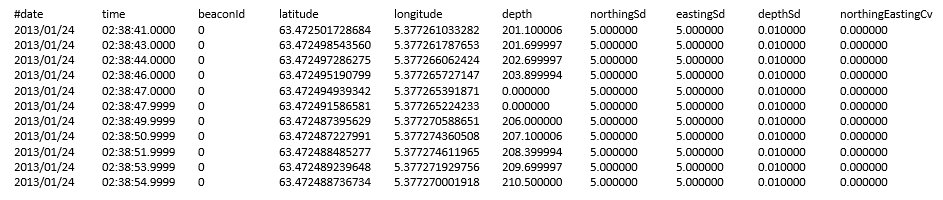
In this example a text file containing USBL data is converted to XPF using the provided definition file. The USBL data has been converted to a specific format as described in the template file USBL.gtd
"C:\Program Files\Exail\DELPH INS Subsea\
GenericText2Xpf.exe" /autostart on /def "C:\Program Files\Exail\DELPH INS Subsea\Templates\USBL.gtd" usbl.txt usbl.xpf
