PostproIns
Purpose
This command line application, available in the installation folder, processes raw navigation data stored in one or more *.xpf files according to the settings defined in the user-defined *.xml parameter file. It also enables GNSS data processing to improve the accuracy of live recorded GNSS data.
Computed data is stored in output files, *.xpf file for inertial processing and *.obs file for GNSS processing.
The configuration file (*.xml)can be exported from the Delph INS Subsea Interface, see the paragraphs below
Usage
PostproIns [/version][/check-schema] [/remote] [/autostart {on|off}][/file id path[/file id path][/rover path][/base id path] parameters
Parameters
|
Argument |
Value |
Description |
|---|---|---|
|
/version |
Optional |
Display version information about this application. |
|
/check-schema |
Optional |
Check the schema for the PostproIns XML configuration file. |
|
/remote |
Optional |
Remote mode must be used when this application is embedded into an external application. Default is interactive mode. |
|
/autostart |
Optional |
If autostart is on (default) the process starts immediately, if off, user must type the start command to start the process. |
|
/file id path |
Optional |
Override the path of the xpf data file defined for the given id in the parameters file with the path defined on the command line. Repeat this argument to override multiple xpf data files. |
|
/rover |
Optional |
Can be used to overwrite the path associated to the GNSS rover data file existing in the parameters file. |
|
/base |
Optional |
Can be used to overwrite path associated to the GNSS base station data file existing in the parameters file. |
|
parameters |
Mandatory |
Parameters file name. |
Example
In this example a basic XML processing configuration is used to process the XPF file decoded in the previous example. To generate the XML processing configuration:
| > | First load a project in Delph INS. |
| > | Set the parameters you require for your processing and save the configuration by selecting the Prepare batch processing option from the ribbon. |
The command line parameters for this application are straight forwards, simply passing the XML configuration file as the only parameter.
"C:\Program Files\Exail\Delph INS Subsea\PostproINS.exe" out-ins-parameters.xml
The complexity comes within the XML configuration file. For the demo file the below, the XML configuration will result in a basic enhanced processing of the original logged ROV dive.
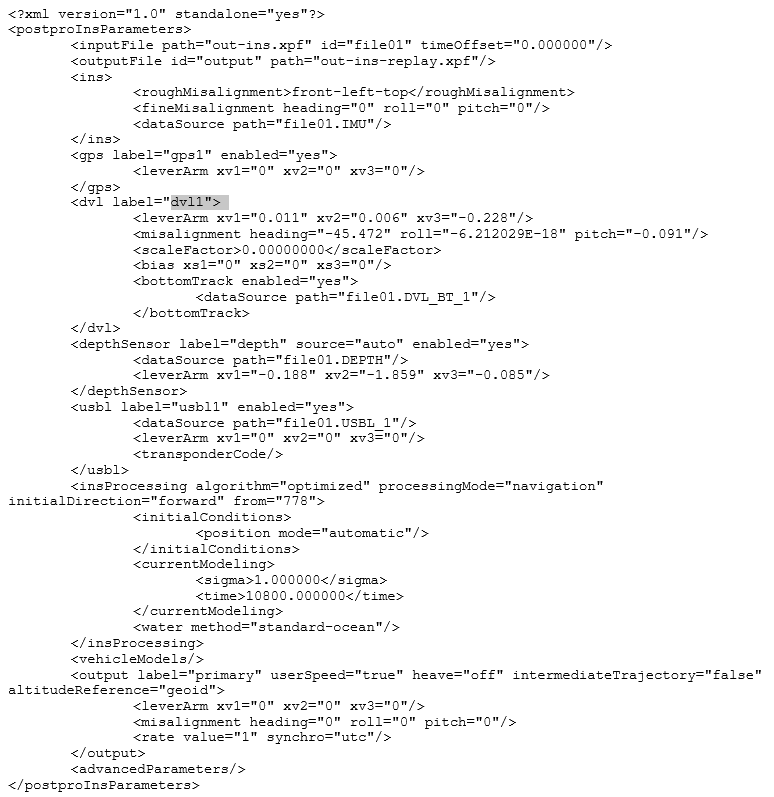
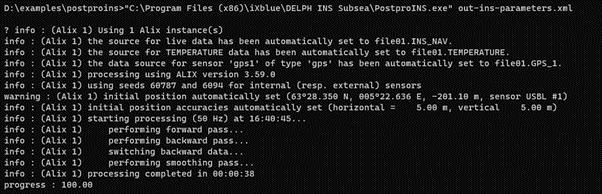
In the above example we use the data sources as they are configured in the configuration file. A more useful feature, is to override the input and output files specified in the configuration file by specifying them on the command line
"C:\Program Files\Exail\Delph INS Subsea\PostproINS.exe" /file file01 InsFile2.xpf /file output File2-Proc.xpf out-ins-parameters.xml
In the above command we use the same parameters file to process the raw INS file “InsFie2.xpf” and save the results to “File2-Proc.xpf”
Preparing a Command File from a Delph INS Subsea Project
You may prepare an XML processing parameters file directly from a Delph INS Subsea project. Once you have created this XML file, you may edit it as you wish and use it in the command prompt associated to the PosproIns command.
If you change the name of the file, you should edit also the time interval of the processing.
| 1. | In the Processing panel set all the processing parameters that you want to apply on your data. |
| 2. | In the Processing parameters tab, select Prepare batch processing and name the output XML file. The file is created. |
| 3. | Open and edit the XML file. You may change the input (/file main filename.xpf) and/or output file (/file output filename.output) names etc. |
| 4. | Open a command prompt. Run the PosproIns.exe processing command line with your XML file as parameters file. See paragraph below. |
An example (postpro-ins-parameters.xml) processing parameters file is provided in the ”Doc” sub-folder of the installation folder. This file includes comments and extensive documentation for each xml elements and attributes that may appear in a parameters file. It can be used as an additional help when you prepare a batch processing sequence. It can be edited to create a specific Processing-param.xml file. It is also a source of help for XML format syntax.