Xpf2Kml
Purpose
This command line application extracts a geographic track included in one channel of the *.xpf data file. The result is stored into a *.kmz data file and then can be visualized by Google Earth.
Usage
Xpf2Kml [/version] [/remote] [/autostart {on|off}] /c channel [/l field][/gb field] [/from time] [/to time] [/dec 100] [/points {on|off}] [/pointColor {default|sd|aabbggrr] [/pointScale scale] [/track {on|off]] [/trackColor aabbggrr] [/trackWidth width] [/tmin threshold] [/tmax threshold] [/am mode] [/asf 2.2] [/ao 12.7] [/toffset time] [/utcOrigin yyyy-mm-ddThh:mm:ss.sss] [/compression {on|off|auto}] input output
Parameters
|
Argument |
Value |
Description |
|---|---|---|
|
/version |
Optional |
Displays version information about this application. |
|
/remote |
Optional |
Remote mode must be used when this application is embedded into an external application. Default is interactive mode. |
|
/autostart |
Optional |
If autostart is on (default) the process starts immediately, if off, user must type the start command to start the process. |
|
channel |
Mandatory |
Indicates channel to extract the data from. |
|
/l field |
Optional |
Indicates the name of the field containing the latitude. |
|
/gb field |
Optional |
Indicates the name of the field used to group data (group by). |
|
/from |
Optional |
Time of the first frame to be exported (s). |
|
/to |
Optional |
Time of the last frame to be exported (s). |
|
/dec value |
Optional |
Decimates output points. |
|
/points |
Optional |
Used to output the points (default: on). |
|
/pointColor |
Optional |
Color of the points in kml color format, if not specified or default, the default color from the configuration file is used. If sd, the color depends on the quadratic mean of deviation. |
|
/pointScale |
Optional |
Size of the icon for points. |
|
/track |
Optional |
Used to output the track (default: on). |
|
/trackColor |
Optional |
Color of the track in kml color format (default: ffffffff). |
|
/trackWidth |
Optional |
Width of the track. |
|
/tmin |
Optional |
Minimal threshold for deviation. |
|
/tmax |
Optional |
Maximal threshold for deviation. |
|
/am(1) |
Optional |
Altitude mode |
|
/asf(1) |
Optional |
Altitude scale factor (if not clamped to ground). |
|
/ao(1) |
Optional |
Altitude offset in meters (if not clamped to ground). |
|
/toffset |
Optional |
Offset to apply on the file time (seconds). This offset shifts the time stamping of the input file in order to transfer the data in another time reference (for example the time reference of the processing in Delph INS Subsea). |
|
/utcOrigin |
Optional |
UTC date/time corresponding to the origin of the file time. |
|
/compression |
Optional |
Compress or not the output file (produce kmz or kml file). |
|
input |
Mandatory |
Input file name (XPF file). |
|
output |
Mandatory |
Output file name (KML file). |
(1) /am /asf /ao: altitude mode:
| > | absolute: altitude data is used to position the point in an absolute way |
| > | clampToGround (default): altitude data is not used, the points are set on the ground or water surface |
| > | clampToSeaFloor: altitude data is not used, the points are set on the sea bottom |
| > | relativeToGround: altitude data is added to the ground altitude |
| > | relativeToSeaFloor: altitude data is added to the altitude of the sea bottom |
In the absolute and relative modes an offset /ao and a scale factor /asf can be added to the data in Google Earth.
Example
The Xpf2Kml app can be used to generate KML or MKZ files for use in google earth or other geographical viewer applications. KML is an international standard managed by the Open Geospatial Consortium and is a useful format for importing 3D geographical data in to GIS applications.
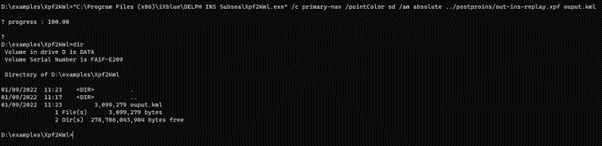
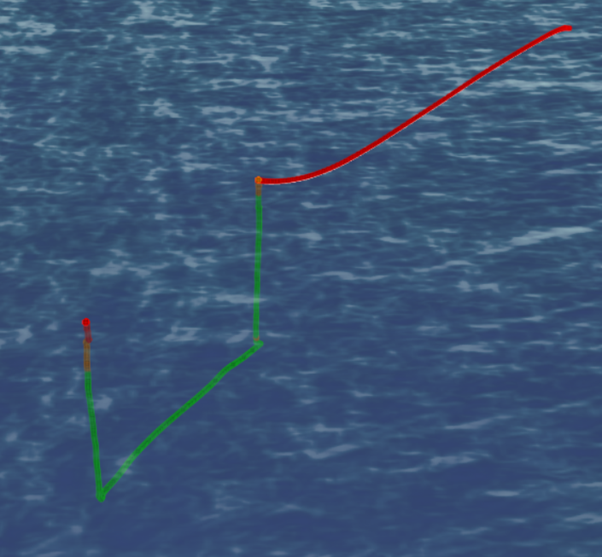
In this example we will export the primary lever arm position from the same file treated previously. We will set the point colour to reflect the INS SD i.e. alignment status, and we will set the altitude mode to be absolute i.e. we will export the 3D track of the vehicle.
D:\examples\Xpf2Kml>"C:\Program Files\Exail\Delph INS Subsea\Xpf2Kml.exe" /c primary-nav /pointColor sd /am absolute ../postproins/out-ins-replay.xpf ouput.kml