Computing XPF file differences
The difference of two channels from two different XPF files can be computed, stored in an XPF file and can be displayed in the Time view.
|
1.
|
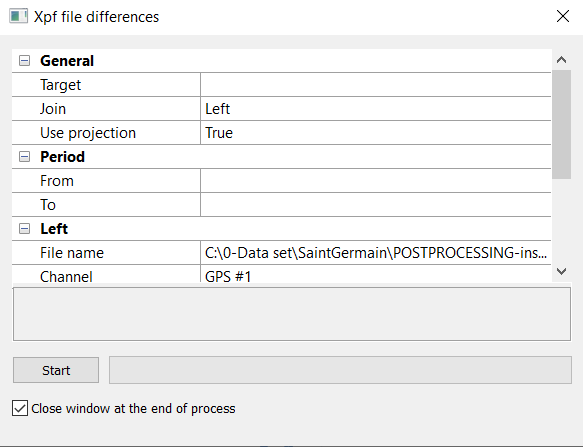
In the Variables panel, right-click and select Compute XPF file differences. The following window is displayed: |
|
>
|
edit the Target: name of the result XPF data file. |
|
>
|
select the Join option between |
|
●
|
Any: a difference is computed when at least one data set has a time value |
|
●
|
Left: a difference is computed when the Left data set has a time value |
|
●
|
Right: a difference is computed when the Right data set has a time value |
|
●
|
Both: a difference is computed when both Right and Left data sets have a time value |
|
>
|
select the User projection option between: |
|
●
|
True: differences on geographic position are computed |
|
●
|
False: differences on geographic position are not computed |
|
3.
|
In Period, select a period of time (between From to To) where the differences will be computed. |
|
4.
|
In Left and Right, select (if not already selected) the two files (File name, Channel) for the differences. |
|
5.
|
Click on Start button. The XPF file is created. |
|
6.
|
To see the differences, add this file to the Variables panel then drag and drop the channel to the Time view. |