Instant Values Panel
This panel displays the current values of the different parameters corresponding to the position of the cursor over their respective graphs in the Time view.
| > | Drag and drop a parameter from the Variables panel to the Time view. |
| > | Drag and drop the same parameter from the Variables panel to the Instant values panel to view its different values corresponding to the cursor position. |
When no graph is present in the Time view, the panel displays the values of the parameters at the time indicated.
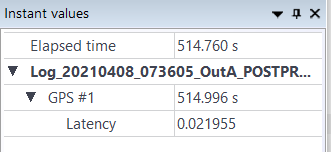
Instant values panel
You can enter a date/time in this field.
For each data, the accurate date/time is repeated, e.g. if you enter 12:00:00.00 in this Time field, you can have 12:00:00.005 for IMU data because it’s the time for the data which is closest to 12:00:00.00.
The same principle is applicable for all the other channels.
The Remove contextual menu is available to remove a parameter from the Instant values panel.