Processing Panel
This panel contains the parameters that you can edit before launching data processing.
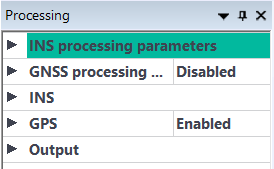
Processing panel
|
>
|
Click on the sign  in front of an item or double click on the name of the item to expand it Information in this panel is in a top-down mode. in front of an item or double click on the name of the item to expand it Information in this panel is in a top-down mode. |
|
>
|
You can expand / collapse the different parameters with the [+] and [-] buttons. |
|
>
|
A right click with the mouse on a parameter gives access to contextual menus with specific commands which depend on the selected parameter. |
|
>
|
The different instructions can be limited to a given period (From and To); if the limits are not indicated, this means that the period is by default from the “start” to the “end”. |
|
>
|
Incorrect information is displayed in red; this color indicator is propagated to the parent data. All entered data must be correct before launching the post-processing. |

|
|
>
|
You can shift the separator between the variable names and the variable values in order to better display the names and values that might be too large. |
|
>
|
When you enter data for a given parameter in the Processing panel, all the associated data remains in red color; it changes to black color when the overall correct data has been entered. |
|
Pop-up menus
Pop-up menus are available with their different commands following the functions.