Spatial Reference
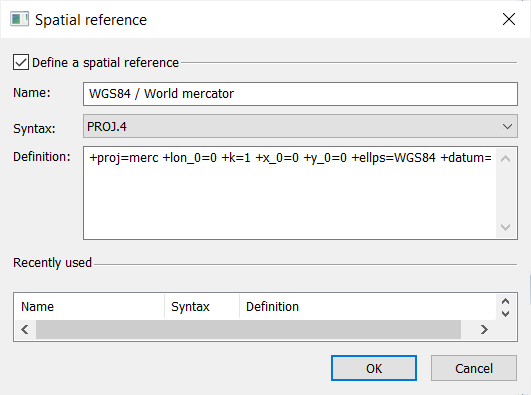
The spatial reference describes the coordinate system in which the data are referenced and is used to display the trajectories of the plan view. The spatial reference has the attributes:
|
>
|
Syntax: there are four syntax to describe a spatial reference: |
|
>
|
Description: the details of the geographic and projection systems are accessible from a library file. This file is named coordinateSystemLibrary.html (available from Start menu > Exail> Delph INS Subsea > online documentation) and gives access to the textual information to add your template file inside. Follow the procedure below to access the description of the geographic or projected systems. |

|
The input spatial reference must be WGS84, otherwise the projection on a new frame is not precise. This is the case if the GNSS position itself is expressed in the WGS84 frame. In case of use of the GNSS with an external base, beware to have the differential correction defined in the WGS84 frame to use this functionality.
|
|
2.
|
Select  ► Spatial Reference. A dialog box is displayed. ► Spatial Reference. A dialog box is displayed. |
|
3.
|
Click the checkbox to activate the definition of a spatial reference. |
|
4.
|
You may select a spatial reference among the Recently used list. |
|
6.
|
Select the Syntax in the list. |
|
7.
|
Type in the Description of the spatial reference. |
|
8.
|
Click OK to validate your choice. |