Variables Panel
The Variables panel displays the list of data files in the project:
| > | The main data file (in input, this file contains the IMU data) |
| > | The output data file (or the output data files when an optimized processing is requested and the intermediate files need to be recorded) |
| > | The additional data files which can be used to provide input data for processing or which can be loaded for display/comparison purposes. It is also possible to add in a project the result of a previous project. |
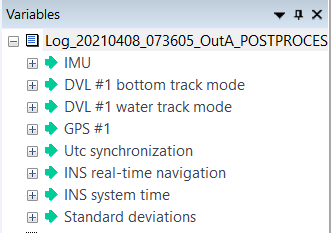
The output data files have the same name as the project file (with *.xpf), the intermediate files have a ”–fw” (forward computation) or “–bw” suffix (backward computation). Data is organized in a top-down manner as follows:
| > | Files are at the top. The files contain channels that contain related data, for instance navigation data, status, etc. |
| > | The channels are composed of fields (curves or chronograms) which can be organized in groups of fields. |
| Icon | Explanation |

|
File |

|
Groups of graphs |

|
Channel |

|
Curve graph |

|
Chronogram graph |
|

|
File contents are continuously analyzed in a background task. For large files, all the channels are not immediately displayed: they only appear once all the fields they contain have been loaded by Delph INS Subsea, which can take few seconds. |
A right click on a channel or a field gives access to pop-up menu (default) which enables the export of data in different formats. Right click on a file gives access to commands on the files.
Default (left) and data file (right) export pop-up menus