Adding Maximum Standard Deviation
You can set the threshold of the standard deviation to a maximum value.
| 1. | Right click on the GPS parameter and select Add Maximum sd. The Minimum sd parameters are displayed. |
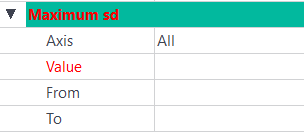
| 2. | Click on the right of the Axis field and select an axis. |
| > | All |
| > | Horizontal |
| > | Vertical |
| 3. | Click on the right of the Value field. Enter the corresponding value. |
| 4. | Click on the right of the From and To fields. Enter the corresponding values. |