Adding a User Standard Deviation
You can set the periods during which the standard deviation used during the survey can be modified.
|
1.
|
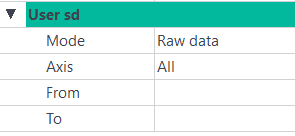
Right click on the GPS parameter and select Add User sd. The User Standard Deviation parameters are displayed: |
|
2.
|
In the Processing panel ► GPS - User sd, click on the right of the Mode field and select a mode: |
|
>
|
Raw data: the live standard deviation will be taken into account. |
|
>
|
Fixed: fixed value is used. When selecting this mode, a Value field is added to the instruction and is displayed in red. Enter a value to be taken into account. |
|
>
|
Scaled: this mode multiplies the values following the chosen scale. When selecting this mode, a Value field is added to the instruction. Enter a value in % to be taken into account.
|
|
3.
|
Click on the right of the Axis field and select an axis. |
|
4.
|
Click on the right of the From and To fields. Enter the corresponding values. |