Position Mode
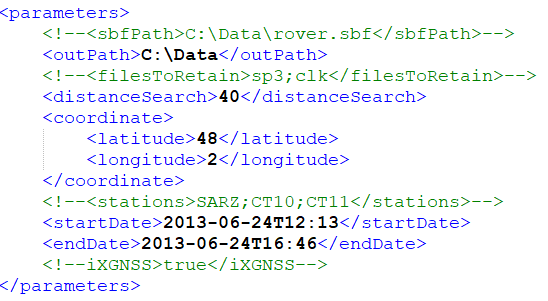
To use GDT_CMD in the Position Mode, the parameters file must set the following settings:
|
>
|
outPath: the folder where downloaded files are stored. |
|
>
|
filesToRetain: specifies the files which will not be erased. Supported values are sp3 (to retain ephemeris files) and clk (to retain clock files).
|
|
>
|
distanceSearch: the search distance around the coordinates (in kilometers).
|
|
>
|
latitude: the latitude of the position (defined in multi-format value) |
|
>
|
longitude: the longitude of the position (defined in multi-format value) |
|
>
|
startDate: the start date of the data to download (GNSS time). The start date format is yyyy-MM-ddTHH:mm where: |
|
●
|
yyyy corresponds to the year on 4 digits |
|
●
|
MM corresponds to the month on 2 digits |
|
●
|
dd corresponds to the day on 2 digits |
|
●
|
HH corresponds to hours on 2 digits |
|
●
|
mm corresponds to minutes on 2 digits |
|
>
|
endDate: the end date of the data to download (GNSS time). The end date format is yyyy-MM-ddTHH:mm. |
|
>
|
iXGNSS: activate iXGNSS mode for GMT_CMD (true / false) |
Coordinates entries are adaptive and allow a wide range of formats:
|
>
|
degrees minutes: 48°34.6789 |
|
>
|
degrees minutes seconds: 48°34'27.4567 |
The sign can be displayed using characters '+' or '-'; you can use the characters 'N', 'S', 'E' or 'W' before or after the value. A 'blank' may appear between the sign and the value (composed of spaces and tabs).
The separators can be:
|
>
|
Decimal separators: '.', ',' |
|
>
|
Degrees separators: '°', 'd', 'D' or ' ' |
|
>
|
Minutes separators: ''', 'm', 'M' or ' ' |
|
>
|
Seconds separators: '"', or ' ' |