Logging Post-processing Data
The logging of the post-processing data during the survey is one of the most important points in order to be able to benefit from Delph INS Subsea, to enhance and correct your inertial navigation data. Inertial navigation principle is based on the integration in time of the rotations and accelerations measurements by the INS internal sensors. It is necessary to have access to all measurements without any gap.
Each byte of post-processing data output by the INS must be logged into a file. If some bytes are missing the accuracy of the post-processing is degraded, and if more bytes are missing the file may become unusable.
INS Configuration
The protocol to record from the INS is the POSTPROCESSING protocol. It is a binary protocol that allows compact recording. Data from external sensors are recorded in full scale and encrypted. The encryption key is inserted in the data flow with a latency of one minute which means that the last minute of recordings is not accessible. The figure below displays the configuration page of the protocol in the Web-Based Graphical User Interface of the INS
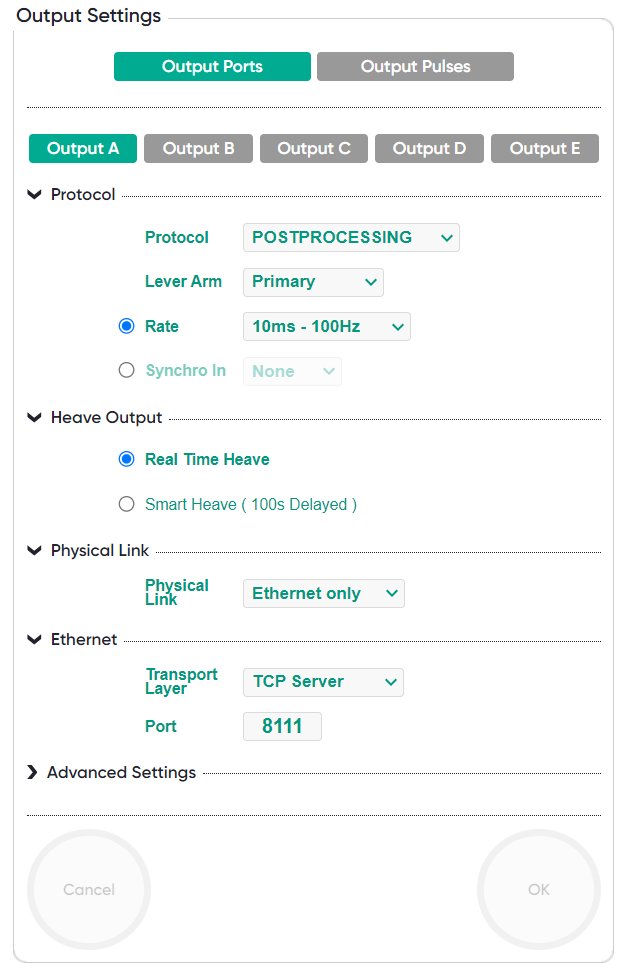
Configuration page of the INS
The lever arm defines where is the localization of the positioning data computed in real time and recorded in the POSTPROCESSING data (Primary Lever Arm, Secondary Lever Arm A, B or C). This choice has no impact on the chance to replay the data.
The Rate field defines the rate of IMU data in the POSTPROCESSING file. Choice must be made between 50 Hz, 100 Hz or 200 Hz values, lower rates are not supported by DELPH INS. Higher the frequency is, better is the accuracy of the post-processing and proportionally greater is the volume of post-processed data. For Subsea applications, we recommend to use data at 100 Hz and at 50 Hz if storage capacities are limited.
With INS third generation, it is possible to transmit data on serial port or on Ethernet port. We recommend the use of Ethernet in TCP mode because this mode ensures that no data is lost in the transmission. If the installation does not allow the use of Ethernet, a serial link must be use at 115.2 kbs.
Recording Time
Since the firmware INS III CINT v5.xx version, the INS configuration data are recorded in POSTPROCESSING data. It needs approximatively 400 seconds recording to transmit the whole configuration. The recording must then be of a length greater than 2 x 400 s to ensure that a whole configuration is present in the dataset.
Data Volume
The data volume depends of the acquisition rate of the external sensors (GPS, DVL, …) but it is essentially linked to the rate of IMU data (50 Hz, 100 Hz or 200 Hz). At 50 Hz the data volume of POSTPROCESSING data is approximately 11 mB per hour, at 100 Hz it is 21 Mb per hour.
Recording Software
Internal datalogging is available following the INS type. Please refer to the corresponding product user manual you are currently using.
In case of external data logging, Exail recommends to use Exail Multilogger, this tool can be downloaded from the Exail download center: https://download.exail.com/delph-ins/
Hardware logging device
This device stores the data on a memory card (up to 64 GB). The files are stored using FAT16 or FAT32 file system so if you plan to record a long survey (data file size above 4 GB) you have to enable the “Schedule File Closing” feature which can spread the recorded data into multiple files using a fixed time period or a fixed size strategy for the splitting operation. After configuration this device is autonomous and starts recording after powering up. We recommend you use first class Compact Flash memory card to avoid any trouble.