Adding an Altitude Mode
The estimation of the altitude cannot be done by pure inertial means because the error would increase exponentially. The altitude of the INS is stabilized (either by external sensor data or artificially) to prevent this exponential growth of the altitude error. The stabilization of the altitude is parametrized by an altitude mode. Five different altitude modes are available.
|
>
|
Live: the altitude of the INS is the altitude recorded during the survey |
|
>
|
Stabilized: the altitude is stabilized around the altitude manually entered (see Initial Conditions – Position) or the last valid altitude when switching from another mode. |
|
>
|
GPS: the INS filters the altitude computed by the GPS sensor, according to the GPS altitude standard deviation. In case of sensor dropout longer than 600 s, the altitude value is stabilized around the last valid value. If two GPS are used, priority is given to GPS #1. |
|
>
|
Depth: the INS filters the immersion provided by the Depth sensor, according to the Depth standard deviation. In case of sensor dropout longer than 10 s, the altitude mode is automatically switched to USBL. If no USBL is present / valid, the altitude value is then stabilized around the last valid value. |
|
>
|
Hydro: this mode is equivalent to the GPS mode but only fix-RTK values (GPS mode 4) are used. It is recommended during hydrographic surveys, where stabilization around the last fix-RTK value is more precise than using float-RTK values in difficult areas (i.e. before / after bridges). Notice: this mode should only be used in hydrographic application, as the engine takes advantage of the very slow variation of the actual altitude to improve its model. In other environment, this could lead to degraded results. |
|
>
|
USBL: the INS filters the altitude computed by the USBL sensor, according to the USBL altitude standard deviation. For sensor dropout longer than 600 s, the altitude value is stabilized around the last valid value. If your data were acquired with an old firmware, it is recommended to check the sign and quality of the USBL altitude values before using this mode. |

|
If a speed sensor is present and valid (i.e. DVL), there is no automatic switch to stabilized mode in case of sensor dropout, as the altitude is computed using the Z speed information.
|
|
1.
|
You have two ways to add an Altitude mode instruction in the processing parameters: |
|
>
|
Right click in the Processing panel and select Add altitude mode in the menu. |
|
>
|
Select Processing parameters ► Inertial processing ► Add altitude mode. |
A new Altitude mode instruction is added to the Processing panel:
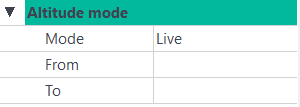
There is no limitation in the number of Altitude mode instructions that can be added.
|
2.
|
Click on the right of Mode and select an item in the pull-down menu. |
|
3.
|
Click on From and enter the beginning of the interval where the mode is to be applied. |
|
4.
|
Click on To and enter the end of the interval where the mode is to be applied. |