Adding a Position Priority
A position priority instruction allows the user to define the position priority (GPS or USBL) in a time range.
|
1.
|
You have two ways to add a position priority instruction in the processing parameters: |
|
>
|
Right click in the Processing panel and select Add position priority in the popup menu. |
|
>
|
Select Processing parameters tab ► Inertial processing group ► Add position priority. |
A position priority instruction is added to the Processing Panel:
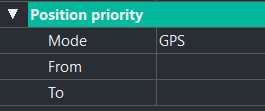
There is no limitation in the number of position priority instructions that can be added.
|
2.
|
Click on the right of Mode and select an item in the pull-down menu. |
|
3.
|
Click on From to edit the corresponding time value. Enter the beginning of the interval where the mode is to be applied. |
|
4.
|
Click on To to edit the corresponding time value. Enter the end of the interval where the mode is to be applied. |