Adding a Synchronized output
This option allows you to synchronize the output rate of the algorithm results with data records from the aiding sensor. The data is interpolated between the two closest algorithm calculations (Frequency linked to IMU logging frequency). Synchronized output is aimed:
|
>
|
To output trajectory data synchronized with event marker received by the INS through the TTL pulses (e.g.: sent by the camera) |
|
>
|
To output trajectory data synchronized with events listed in an external data file provided by the user during the post-processing stage |
|
>
|
To synchronize output data on an aiding sensor |
|
1.
|
You have two ways to add a synchronized output in the processing parameters: |
|
>
|
Click on the Output in the Processing panel. Then in the Processing parameters tab ► Output area, select the Add synchronized output. |

|
>
|
In the Processing panel, right click in the Output item and select Add synchronized output in the pop-up menu: |
A Synchronized instruction is added to the Output parameter.
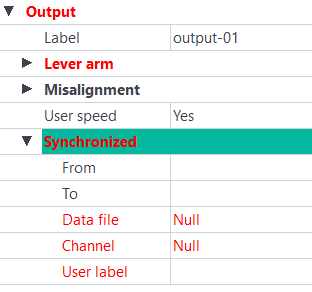
Several Synchronized instructions can be added to the Output parameter.
|
2.
|
Enter the From/To values: |
|
>
|
From: date at which this definition is valid (since the start if empty) |
|
>
|
To: date until when this definition is valid (until the end if empty) |
|
3.
|
In the Variables panel, drag and drop the output in the Data file or Channel field. |
The Data file and the Channel fields are filled with the corresponding data.
Note: The default value for these two fields is Null.
|
4.
|
Enter the values in the User label which identifies the event during an export; the character string must contain 12 characters maximum and is limited to [a-z A-Z 0-9|-|_]+. |