Adding an Output
|
1.
|
You have two ways to add an output in the processing parameters: |
|
>
|
Click in the Processing tab then select Add output. |

|
>
|
Right click in the Processing panel and select Add output in the pop-up menu. |
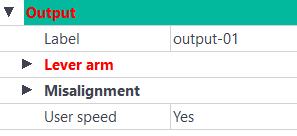
An Output instruction is added to the Processing panel. Several output instructions can be added.
|
2.
|
Enter the Label which is the channel identifier in the result file. |
|
3.
|
Enter the Lever arm values which are the lever arm of the monitoring point with respect to the INS. |

|
You can copy the INS configuration lever arm values to the primary output lever arm by right-clicking on the Lever arm fields.
Then click on the displayed message. The INS configuration lever arm values are now displayed in the primary output lever arm.
INS configuration can be displayed by right clicking in the Variables panel then select Export INS configuration. The INS configuration is then displayed in your browser.
|
|
4.
|
Enter the Misalignment values which are the misalignment of the output frame with respect to the vehicle frame. |
|
5.
|
Select if the User speed is to be output. |
|
6.
|
Select if the Intermediate trajectory is to be output. |
|
7.
|
Enter the Rate values: |
|
>
|
From: date at which this definition is valid (since the start if empty) |
|
>
|
To: date until when this definition is valid (until the end if empty) |