Depth
In the Processing panel at left, right click on a parameter and select Add Aiding
Sensor then select Depth sensor. The following instruction is added to the processing panel:
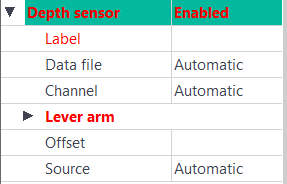
The values displayed in red must be entered.
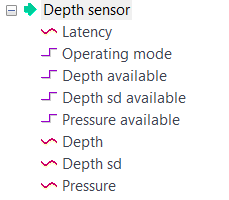
Depending of the type of depth sensor and of the firmware of the INS , POSTPROCESSING data managed by Delph INS Subsea may contain a depth value or a pressure value or both:

|
1.
|
Click besides Label and enter a unique label. A Label is a free text enabling identification of a sensor when different sensors are used. |
|
2.
|
There are two ways to add a data file in the Variables panel: |
|
>
|
Click on the Add data file button in the ribbon and select the file. |
|
>
|
Right click in the Variables panel, choose Add data File and select the file. |
If the data file is not in XPF file format, a conversion is proposed.
|
3.
|
In the Processing panel, expand the sensor to configure, click besides Data File. |
|
4.
|
Drag and drop the data file that was added in the Variables panel in the Data File field. |
The Data File field references now the path of the selected data file, the Channel field displays the associated channel.
|
5.
|
Click on Clear data source (which is active) if you want to remove the link to the data file and to display the default Automatic mode in both Data file and Channel fields. |
|
6.
|
You can modify the lever arms of the sensor. This feature helps you to improve the accuracy of your navigation. Three offsets XV1, XV2, XV3 can be set. |
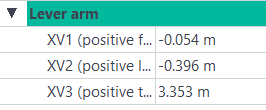
Enter the values of the XV1, XV2 and XV3 in the corresponding fields.

|
You can copy the depth lever arm values to the primary output lever arm by right-clicking on the Lever arm fields.
Then click on the displayed message. The depth lever arm values are now displayed in the primary output lever arm.
|
|
7.
|
You may add an Offset to the depth sensor data. The entered value is added to the depth (read or computed). |
|
8.
|
Select the Source parameter, it details which information is used during processing by Delph INS Subsea |
|
>
|
Automatic: Delph INS Subsea uses in priority the pressure. If not available, it uses the depth value. If none is available, an error message is displayed in the output panel. |
|
>
|
Pressure: Delph INS Subsea uses only pressure data. If the pressure data is not available, an error message is displayed in the output panel. |
|
>
|
Depth: Delph INS Subsea uses only depth data. If the depth data is not available, an error message is displayed in the output panel. |
It is advisable, before processing, to check the immersion sensor data ("Depth", "Pressure", "Depth available" and "Pressure available" display data from the Variables panel to the Time view). If necessary, adjust the "Source" parameter to select "Depth" or "Pressure" in order to take the depth or pressure data into account.
|
9.
|
If you have set Source to Pressure or Automatic, set the Water parameter in the INS processing parameters. The choice of the Water parameter determines how the depth is computed: |
|
>
|
Standard ocean: Depth is computed as detailed in "UNESCO Technical Papers in Marine Science n°44, Algorithms for computation of fundamental properties in seawater" with parameters of a standard ocean (temperature 0°C, and salinity 35 PSS - 78). Gravity is computed function of latitude as detailed in "UNESCO Technical Papers in Marine Science n°44, Algorithms for computation of fundamental properties in seawater". |
|
>
|
Average density: Depth is computed from the provided average density (999.972 kg/m3 if not provided) via the following formula: |

|
>
|
Density profile: Depth is computed as detailed in the UNESCO technical paper but the density is integrated all along the water column using one or several density profile(s). |