GIS Format
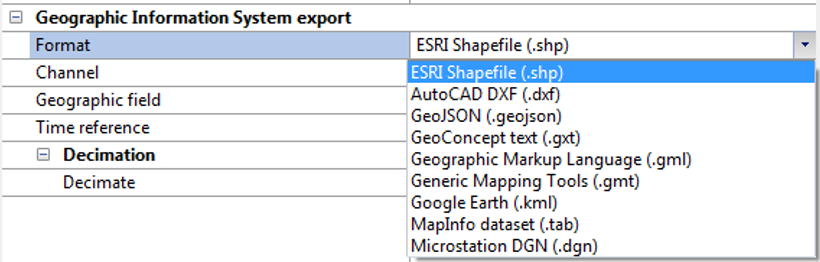
Delph INS Subsea can export the results of your computation in a variety of standard GIS file formats. You can choose the Geographic export option to export navigation and associated parameters (standard deviations, speed, attitude…). The following formats are supported:
|
>
|
Generic Mapping Tools (*.gmt) |
|
>
|
GeoConcept text (*.gxt) |
|
>
|
Geographic Mark-up Language (*.gml) |
|
>
|
MapInfo dataset (*.tab) |
|
>
|
Microstation DGN (*.dgn) |
|
1.
|
In the Variables panel, right click on the desired variable and select Export to GIS. |
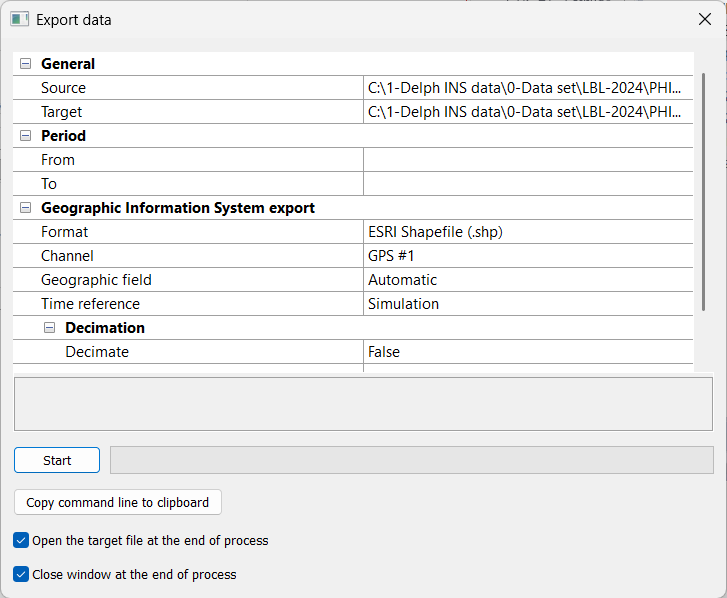
The Export data window is displayed.
|
2.
|
Click on Source. Click on  and browse to select the file (e.g.*-ins.xpf) that you want to export into a GIS format. You can export a *.xpf file. and browse to select the file (e.g.*-ins.xpf) that you want to export into a GIS format. You can export a *.xpf file. |
|
3.
|
Click on Target. Click on and browse to select the output file (e.g.*-ins.xpf.shp) in which you want to export into a GIS format. |
|
4.
|
Expand the Period of exportation: enter a From and a To values. |
|
5.
|
Expand the Geographic Information System export parameter. |
|
6.
|
Click on the right of Format and select the format in the pull-down menu. |
|
7.
|
In the case where you export a *.xpf file: click on Channel to select the item and again to expand the scroll menu and select the channel from which you want to export the data. Geographic field is set to Automatic. |
|
8.
|
Click on the right of Time reference: select File or Simulation in the pull-down menu. |
|
9.
|
Click on Decimate to select the item and again to expand the pull-down menu and select the True or False option. If you choose True then click two times on the Value item and enter the decimation interval. |
|
10.
|
You may select the Open the target file at the end of the process and / or Close window at the end of the process options. |
|
11.
|
Click on to run the export. |
For each point the following attributes are defined:
|
>
|
Standard deviation on latitude (meter) |
|
>
|
Standard deviation on longitude (meter) |
|
>
|
Standard deviation on altitude (meter) |
|
>
|
Crossvariance between latitude and longitude (meter²) |