Managing the Aiding Sensors
The purpose of using an aiding sensor is to limit the INS drift. Delph INS Subsea enables configuring the aiding sensors to modify information used during the survey (lever arm, misalignment, etc.) and adding processing instructions to modify data computation all along the post-processing. It is possible to:
| > | Apply adjustments to the data from an aiding sensor that was connected to the INS during the survey |
| > | Add an aiding sensor that was not connected to the INS during the survey |
| > | Both options are designed to improve the quality of the inertial navigation data. Two methods can be used to add or remove aiding sensors from the project: |
| ● | In the Processing parameters tab, use the Add aiding sensor command |
| ● | In the Processing panel, right click on a parameter to get access to a drop-down menu and select the Add aiding sensor command |
Delph INS Subsea manages the following aiding sensors:
| > | GPS |
| > | DVL (bottom track, water track) |
| > | DEPTH sensor |
| > | RANGE meter (LBL) |
| > | USBL |
| > | EM Log |
For each aiding sensor, you specify the sensor label, data file, channel, the lever arms and additional sensor specific parameters. When several instructions are superposed, the last instruction overrides the previous one.
The data file is added by means of the Add data file in the Variables panel; then drag and drop to associate the channel. For each sensor you can choose to use data acquired by the INS during the survey or to use data stored in a data file that was acquired by a sensor that was not connected to the INS or a data file provided by a third party post-processing software. Delph INS Subsea allows you to include this data into the current project. By doing so, you merge the external data file into the final processed navigation data file. This feature is very useful when you want to do a computation with post-processed external data (post-processed GPS for example) or when you use external data from a sensor that was not connected to the INS. Without data file, the mode is set to Automatic. In this mode the first available channel corresponding to the expected data type is used. The external data file formats are:
| > | Text file GPS |
| > | GrafNav Novatel (Exail template) |
| > | Exail USBL $PTSAG |
| > | Teledyne RD Instruments PD6 |
Delph INS Subsea can support additional data formats upon customer request.
Several instructions could be added for these aiding sensors:
| > | Add operating mode. The operating mode is used to process the data from a sensor on a different operating mode than the survey mode. |
| > | Add user standard deviation. This instruction is used to edit the standard deviation associated to a sensor. |
| > | Add minimum standard deviation. You can set the threshold of the standard deviation to a minimum value. |
| > | Add maximum standard deviation. You can set the threshold of the standard deviation to a maximum value. |
These instructions are detailed after the sensors description chapters.
Adding an Aiding Sensor
| 1. | You have two options to add a sensor: |
| > | Select Processing parameters ► Add aiding sensor and select the sensor. |
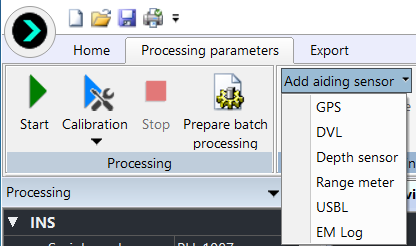
| > | In the Processing panel, right click on a parameter. Select the Add aiding sensor command and select the sensor of your choice in the pop-up menu. |
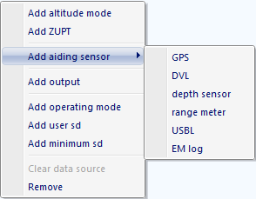
The selected sensor is displayed in the Processing panel.
| 2. | Expand the sensor to display its parameters. |
Removing an Aiding Sensor
| 3. | 1. In the Processing panel under Sensors, click on the sensor name to select it. |
The line of the sensor is highlighted.
| 4. | 2. Right click on the sensor item then select Remove in the pop-up menu. |
A warning message is displayed to confirm the deletion. Then the selected sensor is removed from the Processing panel.
Enabling an Aiding Sensor
The purpose of enabling and disabling a sensor is to do different tests while keeping the same entered data.
| 1. | In the Processing panel, click besides a sensor name and select Enabled in the menu. |
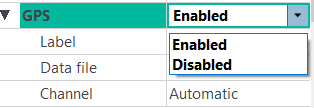
|
|
|

|
Only a certain number of sensors of the same type can be activated concurrently. If too many sensors are activated concurrently, an error is indicated (red display):
|
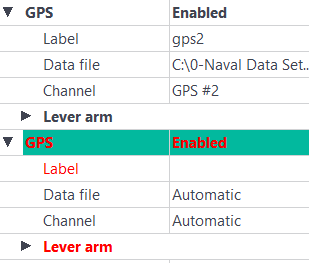
| Sensor | Maximum number of sensor |
| GPS | 2 |
| DVL | 2 |
| Depth | 2 |
| LBL | 1 Multi-transponder, 10 fixed transponders |
| USBL | 3 transponders |
| EM Log | 2 |