SBET Format
This function converts a trajectory contained in a data file (data computed by the software) into a Smooth Best Estimate Trajectory (SBET) format file defined by Applanix and supported by different data processing tools (e.g. RiProcess, QINSy or CARIS).
In the output files, the wander angles, accelerations and angular rates are set to zero.
The fields of the file are defined as follows:
|
>
|
Time (depending of the configuration of the processing): |
|
●
|
Number of seconds since midnight the last Sunday (time of week) |
|
●
|
Number of seconds since midnight the same day (time of the day) |
|
>
|
Latitude, Longitude, Altitude: position in radians and meters |
|
>
|
X velocity, Y velocity, Z velocity: speeds in the vehicle frame (x forward, y to the left, z upwards) in m/s |
|
>
|
Roll, Pitch and Platform Heading: orientation information (Roll positive when the left of the vehicle goes up, pitch positive when the front of the vehicle goes up) in radians |
|
>
|
Body acceleration x, y, z: always 0 |
|
>
|
Body angular rate x, y, z: always 0 |
|
1.
|
In the Variables panel, right click on the desired variable and select Export to SBET. |
|
2.
|
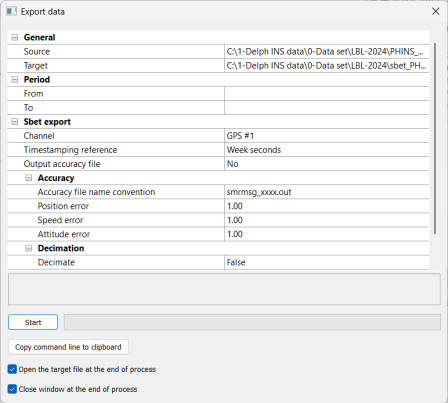
Click on Source. Click on  and browse to select the file (e.g.*-ins.xpf) that you want to export into a SBET format. and browse to select the file (e.g.*-ins.xpf) that you want to export into a SBET format. |
|
3.
|
Click on Target. Click on and browse to select the output file (e.g.*-ins.xpf.out) in which you want to export into a SBET format. |
|
4.
|
Select the Period of exportation by entering the From and To values. |
|
6.
|
On the right of Channel field, select the item in the pull-down menu and select the channel from which you want to export the data. |
|
7.
|
Select a Time stamping reference in the associated scrolling list between: |
|
>
|
Week seconds: official format reference, number of seconds since last Sunday 0 am |
|
>
|
Day seconds: number of seconds since today 0 am |
|
8.
|
Choose if you wish an Output accuracy file or not by selecting (Yes/No). |
|
9.
|
If you decimate the data, set the Decimate option to True and enter a Value. |
|
10.
|
You may select the Open the target file at the end of the process and / or Close window at the end of the process options. |
|
11.
|
Click on Start to run the export. |

|
The output accuracy file contains the position, speed and orientation standard deviation information respectively in meters, meters per second and minute of an angle.
The name of the file is based on the output file name. It can be prefixed with smrmsg as in C:\DATA\smrmsg_my-process.xpf.out or suffixed with -accuracy as in C:\DATA\sbet_my-process-accuracy.xpf.out.
For example if the output file is sample.out, the output accuracy file is sample-accuracy.out.
By default, the filename proposed is that of the input filename, prefixed with 'sbet_' and suffixed with '.out'. The prefix can be modified by editing the configuration file (DelphINS.conf.xml) in the configuration / exportDialog / sbet / filenamePrefix section of the file.
|