User-Defined Format
You can export Delph INS Subsea data under the format of your choice. With the User Defined Template option, you choose a template file (with a *.popudt extension) defining the output format. Delph INS Subsea is delivered with a couple of template files (Appendix User Defined Export Template). These template files can be edited.
|
1.
|
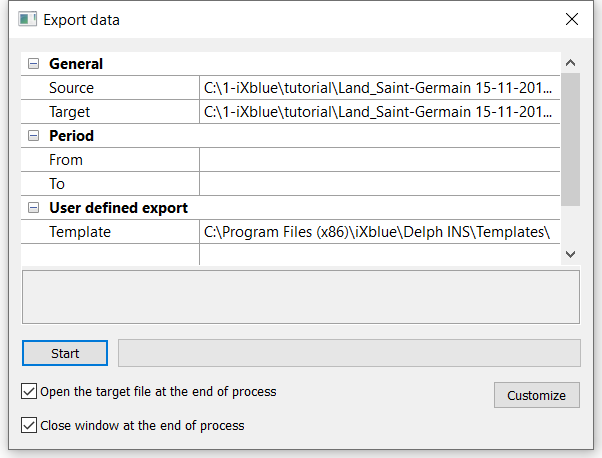
In the Variables panel, right click on the desired variable and select Export using a user defined template |
|
2.
|
Click on Source and then click on  and browse to select the file (e.g. *.xpf) that you want to export into a user-defined format. and browse to select the file (e.g. *.xpf) that you want to export into a user-defined format. |
|
3.
|
Click on Target and then click on and browse to select the output file in which you want to export into a user-defined format. |
|
4.
|
Select the Period of exportation: enter a From and a To values. |
|
5.
|
Click on the right of Template and browse to choose the template file (*.popudt file). |
Note: The user defined template must be a valid one.
|
6.
|
Check the Data source ‘main’: File and Channel field. |
|
7.
|
You may select the Open the target file at the end of the process and / or the Close window at the end of the process options. |
|
8.
|
Click on Start to run the export. |